AI website builder
Build a website with AI
Describe the website you need, and the AI agent Kamu builds it. The structure, look and content are not tied to a template, so you can ask for exactly the site you want.


Build exactly the site you want
Sites built with Kotisivukamu are not based on ready-made templates. Kamu writes the code of the site directly in the form a browser reads. This is why the site can have practically anything a web page can have.
- Structure.Add pages, remove sections and change their order. A service can have its own page, or all services can be on one.
- Look.Change colours, fonts, images and the layout of a single section or the whole site.
- Content.Have texts rewritten, shortened or translated, or write them yourself.
- Features.Add a form, a price calculator, a gallery, a map, a blog, a booking button or another language.
Kamu helps you decide what to put on the site
You still do not have to start from nothing. Kamu has access to Kotisivukamu’s own component library, with ready-made ways to present services, a price list, customer feedback or frequently asked questions, for example. Kamu suggests the ones that fit your business and tells you what visitors usually look for on a site like yours.
The components are starting points. When you find one you like, you can change it freely. You decide what goes on the site.
Editing the site is easy
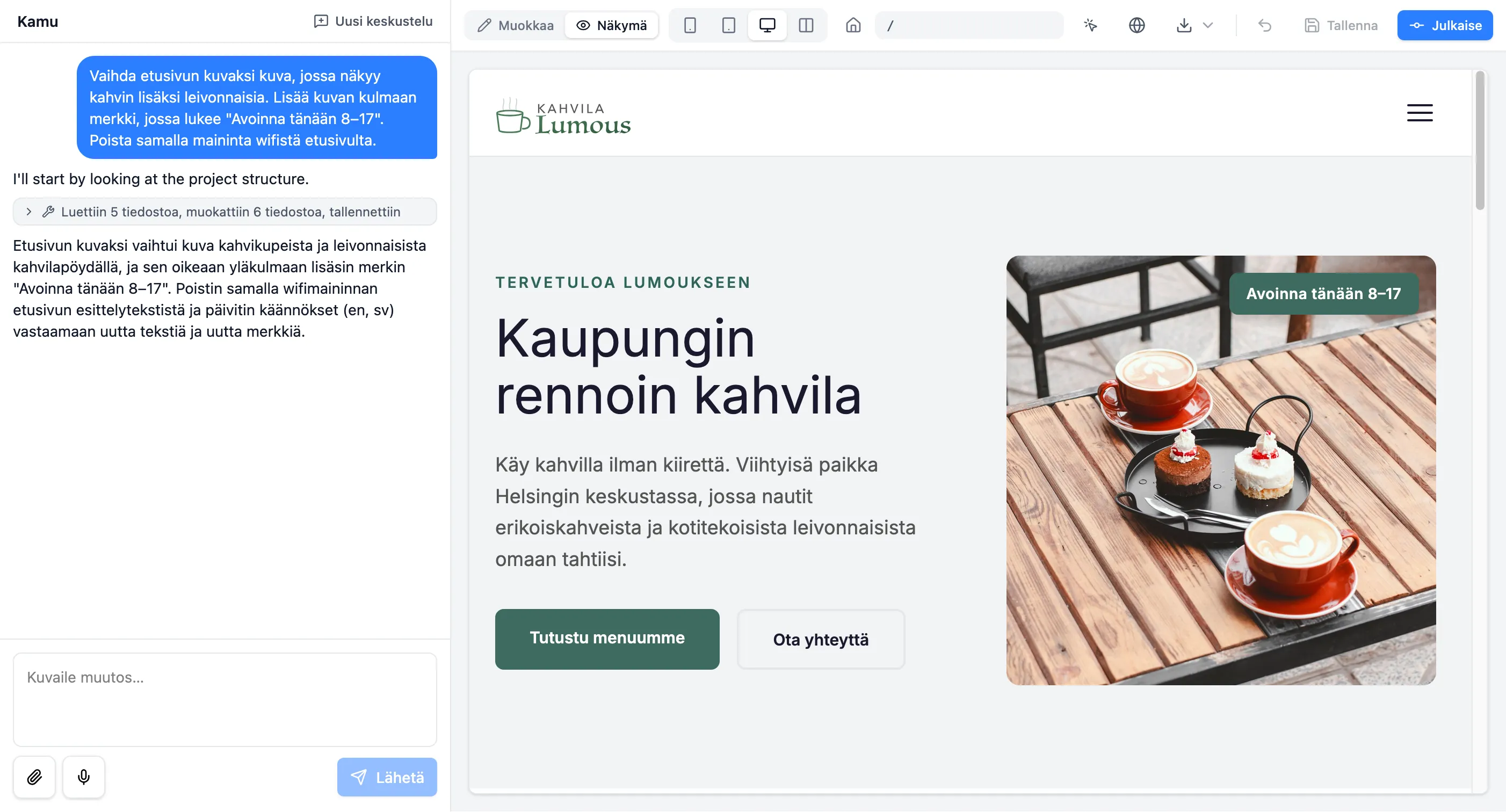
- You write what you want. For example “add Saturday opening hours to the contact page”. Kamu works out which files to change and makes the change.
- You can do it where you already are. Requests can be sent in WhatsApp, in the dashboard chat or in Studio. In WhatsApp a request can also be a voice message or a photo.
- You see the change before it is published. Changes appear in the preview first. They reach your live site only when you publish them, and earlier versions are kept.
- You can also edit by hand. In the dashboard text editor you edit the texts of the site directly, and articles have an editor of their own.
- There is nothing to install or update. Hosting, backups, updates and the HTTPS certificate are included in the plan.
You can also edit the site with Claude or ChatGPT
If you already use an AI app, you can connect it to Kotisivukamu and edit the site from there. The app can read the content of the site, change texts and pages, write blog drafts and, if you allow it, publish the changes.
When you connect the app, you choose which sites it can reach and whether it may read, edit or also publish. You connect it by adding the address mcp.kotisivukamu.fi as a connector (MCP server) in the app.
How a website is built with AI
- 1 Describe the site.In the form, fill in the name of your business and a few words about what you do and what you want. If you already have a website, add its address, and its content is used as the starting point.
- 2 Check the proposal.The proposal lists the pages, services, contact details and style the site will be built from. You can correct each of them.
- 3 Kamu builds the site.The build takes about half an hour. You get an email when the site is ready at a preview address.
- 4 Edit and publish.Check the texts, prices and contact details, and ask for the changes you want. When the site is ready, order a plan and connect your domain.
Other ways to get a website
- Website builder.In a website builder you choose a template and edit it yourself in a visual editor. Getting started is quick, and the look stays within what the template allows.
- AI coding tools.With an AI coding tool and free hosting you can build a similar site yourself. It costs less, and it requires the command line, version control and your own maintenance.
- Agency.An agency designs the site with you and does the work for you. Delivery usually takes weeks, and later changes are billed separately.
The services are compared in more detail on the comparison page, and their prices in the price comparison.
Price
Building the site and the 30-day trial are free, and no card is needed. A new user also gets 5 € of Kamu balance for trying out changes. A small change typically uses 0.20-0.50 € of it, so it covers a number of changes.
When the balance is used up, further changes by Kamu need more balance, which you can add when you need it. Talking with Kamu and editing texts yourself are always free.
You need a paid plan only when you publish the site on your own domain. Plans start at 3.90 €/month at VAT 0 %, and the details are in pricing.
Building a website with AI: questions
Does the AI write the texts too?
Yes. It is still worth reading them through, because you know your prices, opening hours and services best.
Can I use my own images and logo?
Yes. You can upload your own logo and images, and they replace the images Kamu chose.
Can I get the source code of the site?
Yes. You can get the full source code of your site on request and move it to another host.
Will an AI-built site be found on Google?
How a site was made does not affect whether Google finds it. Search engines look at the content, the speed and the technical condition of the site. The pages load quickly and have titles, descriptions, structured data and a sitemap in place.
How long does it take until the site is ready?
Kamu builds the site in about half an hour. After that, checking the content and making your own changes takes as much time as you want to spend.
Describe the site you want
Try it freeRead more
How Kamu works
More about the AI agent that builds the site and makes the changes.
Meet Kamu →Examples
Sites built with Kotisivukamu.
See examples →Website redesign
How a new site is built from the content of your current one.
Read about redesign →Website cost
Dated comparison of free platforms, site builders, hosts and agencies with names and prices.
See the comparison →