Websites for your trade
Websites for personal trainers
Checked 16 September 2026
The job of a personal trainer’s website is to say clearly who the trainer is, what the coaching includes and what it costs. When that information is on the site, a client can judge before the first meeting whether the coaching suits them.This guide goes through what the site should cover, how a coaching platform and booking are attached to it, what a trainer can say about their training and about results, and what the site costs.
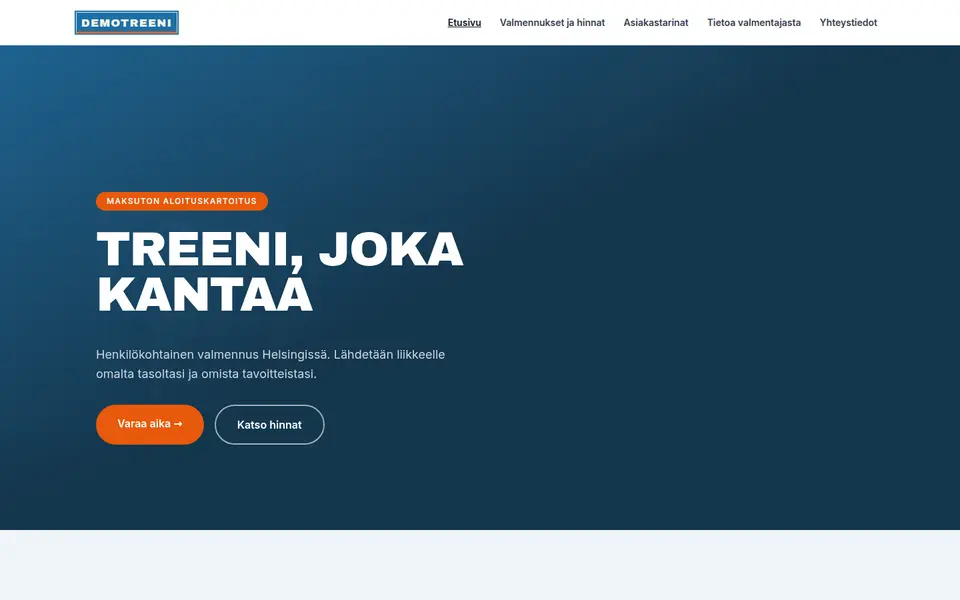

What a personal trainer website needs
Before getting in touch, a client usually wants to know whether the trainer suits them and what the coaching costs. The list covers what we consider the most important things, in order of importance.
-
Prices and packages
The site should say what a single session, for example a ten-session package, and monthly coaching cost, and what each includes. Some clients want one session to check their technique, others stay in coaching for months. When the prices of all the options are visible, the client can pick the one that suits them.
-
A free first conversation
If you offer a free first conversation, it is worth making it clearly visible on the site, because a first meeting with no commitment makes it easier to get in touch. The site should give the length of the conversation and the place, or say whether it happens over a video call. If the client needs to bring or prepare anything, that is worth mentioning too. The first conversation can usually be booked straight from a calendar.
-
Who the trainer is and what training they have
The site should show the trainer’s name and photo, and the qualification or certificate with its issuer. The title is not protected, so your training tells a client more than the title does.
-
Who the coaching suits
The site should say what kind of clients you work with, for example beginners, people returning after a break, competitive athletes, people recovering after childbirth or older clients. It is also good to say in which situations you refer a client to a doctor or a physiotherapist.
-
How the coaching actually runs
The site should describe how the coaching proceeds: how the initial assessment is done, what the programme is like, how often you meet, whether the client can message you between sessions and how progress is followed. A client may find this hard to picture in advance.
-
Online coaching
If you offer online coaching, it is worth presenting as a service of its own. The site should say what the monthly fee includes, which platform the programme is delivered on and how quickly you reply to messages.
-
Small groups and their schedule
If you coach small groups, the site should give the group size, the weekday, the time and the term. If people join the group term by term, it is good to show the number of places left as well.
-
Where the training happens
The site should say where the training happens, for example in your own studio, a partner gym, the client’s own gym or outdoors. If you train in a commercial gym, it is good to say whether the client needs their own membership or whether the guest fee is included in the package.
-
Cancellation terms and how long a package lasts
The site should state the cancellation notice for a single session and any charge. If you sell packages, it is good to say separately how long a package stays valid and how illness affects it. Clear terms reduce disagreements.
-
Client stories, with permission
Publishing client stories and photos needs the client’s written permission, and results are best described soberly.
-
A contact form
The form should ask for the client’s goal, current training background and suitable times. That gives the first conversation a ready starting point.
-
Contact details and business ID in the footer
The footer should carry the business name, business ID, phone number and email address.
-
An up-to-date Google Business Profile
Many people look for a personal trainer nearby through Google, so the Business Profile is worth keeping up to date. The address, photos and contact link should match the site. If you coach online only, it is worth saying so clearly in the profile.
Personal trainers are searched for by city and by goal: "personal trainer Helsinki", "etävalmennus laihdutus", "pt hinta". The city, the coaching formats and the package prices are therefore worth mentioning in the headings and the text, not only in images. So that the business shows up correctly in Google results, the page’s background data gives the type as LocalBusiness, or HealthAndBeautyBusiness if you have premises of your own. The same background data carries the services with their prices and the contact link. Only reviews the site has collected itself may be marked as its rating, never Google reviews.
Coaching platforms and booking
A personal trainer usually runs two systems. The coaching platform is where the programme, the training log and the coaching messages live, and the client logs into it. Booking is separate, and it is mostly needed for the free first conversation, single sessions and small groups. Both are below, with published prices.
| System | Price | Booking address | Notes |
|---|---|---|---|
| Nettiaika | Basic 9.90 €/mo, additional user 7.90 €/mo, prices excluding VAT. The vendor states there are no setup or hidden fees. Free trial. | nettiaika.fi/<yritys> | The only vendor in this table that names personal trainers as a customer group of their own. A light calendar, right for the first conversation and single sessions, not for delivering coaching programmes. |
| DigitalBooker (Varaaheti) | DigitalBooker Easy 15 €/mo, DigitalBooker 49 €/mo, VAT on top. 14 day trial. Add-ons such as an extra professional, online payment and SMS are priced separately in the vendor’s own price list. | varaaheti.fi/<yritys>/fi | The vendor lists gyms and group exercise as well as yoga and pilates studios as trades of their own, but not personal training separately. Handling groups and terms is stronger here than in the light calendars. |
| Vello | Booking from 0 €/mo. Card terminal 0.9 % + 0.25 € per transaction, invoicing 0.5 %, SMS 0.17 €. 30 day trial. The patient-record version is from 48.90 €/mo, but a personal trainer does not need it. | varaa.vello.fi/<yritys> | The vendor does not name personal trainers as a customer group, it leans towards care professions. It does carry group classes plus series cards and gift cards, which is exactly what selling packages needs. |
-
Nettiaika
- Price:
- Basic 9.90 €/mo, additional user 7.90 €/mo, prices excluding VAT. The vendor states there are no setup or hidden fees. Free trial.
- Booking address:
nettiaika.fi/<yritys>- Notes:
- The only vendor in this table that names personal trainers as a customer group of their own. A light calendar, right for the first conversation and single sessions, not for delivering coaching programmes.
-
DigitalBooker (Varaaheti)
- Price:
- DigitalBooker Easy 15 €/mo, DigitalBooker 49 €/mo, VAT on top. 14 day trial. Add-ons such as an extra professional, online payment and SMS are priced separately in the vendor’s own price list.
- Booking address:
varaaheti.fi/<yritys>/fi- Notes:
- The vendor lists gyms and group exercise as well as yoga and pilates studios as trades of their own, but not personal training separately. Handling groups and terms is stronger here than in the light calendars.
-
Vello
- Price:
- Booking from 0 €/mo. Card terminal 0.9 % + 0.25 € per transaction, invoicing 0.5 %, SMS 0.17 €. 30 day trial. The patient-record version is from 48.90 €/mo, but a personal trainer does not need it.
- Booking address:
varaa.vello.fi/<yritys>- Notes:
- The vendor does not name personal trainers as a customer group, it leans towards care professions. It does carry group classes plus series cards and gift cards, which is exactly what selling packages needs.
Coaching platforms that deliver the programme and the follow-up
| Platform | Published price | Free tier or trial | What is worth knowing |
|---|---|---|---|
| My PT Hub | Starter 25 €/mo, Premium 59 €/mo, Ultimate 215 €/mo. Billed annually 22.50 €, 52 € and 195 €/mo. | 30 day trial, no card details. | The only platform here that publishes its prices in euros, so the exchange rate holds no surprises on the invoice. Starter is limited to three clients. |
| ABC Trainerize | Grow 9 USD/mo (2 clients), Pro from 23 USD/mo (5 clients), Studio Plus 248 USD/mo. The price steps up with the client count, taxes on top. | A permanent free tier for one client, plus a 30 day trial. | Prices in dollars. The tiering makes growth predictable but also dearer: crossing a client-count limit raises the bill even if the coaching is unchanged. |
| Everfit | Pro from 19 USD/mo, 16 USD/mo billed annually. Studio from 105 USD/mo (minimum 50 clients). Add-ons are separate, for example payments and packages from 9 USD/mo. | A free tier for five clients, no card details. | Selling packages and taking payments is a paid add-on, not part of the base price. Count it in if you intend to bill monthly coaching through the platform. |
| TrueCoach | Starter 26.34 USD/mo (5 clients), Standard 57.99 USD/mo (20 clients), Pro 136.99 USD/mo (50 clients). Annual billing gives one or two months free. | 14 day trial with no card details, no permanent free tier. | The dearest to start with a handful of clients, because there is no free tier. Wearable integrations only arrive on the Standard plan. |
My PT Hub
- Published price:
- Starter 25 €/mo, Premium 59 €/mo, Ultimate 215 €/mo. Billed annually 22.50 €, 52 € and 195 €/mo.
- Free tier or trial:
- 30 day trial, no card details.
- What is worth knowing:
- The only platform here that publishes its prices in euros, so the exchange rate holds no surprises on the invoice. Starter is limited to three clients.
ABC Trainerize
- Published price:
- Grow 9 USD/mo (2 clients), Pro from 23 USD/mo (5 clients), Studio Plus 248 USD/mo. The price steps up with the client count, taxes on top.
- Free tier or trial:
- A permanent free tier for one client, plus a 30 day trial.
- What is worth knowing:
- Prices in dollars. The tiering makes growth predictable but also dearer: crossing a client-count limit raises the bill even if the coaching is unchanged.
Everfit
- Published price:
- Pro from 19 USD/mo, 16 USD/mo billed annually. Studio from 105 USD/mo (minimum 50 clients). Add-ons are separate, for example payments and packages from 9 USD/mo.
- Free tier or trial:
- A free tier for five clients, no card details.
- What is worth knowing:
- Selling packages and taking payments is a paid add-on, not part of the base price. Count it in if you intend to bill monthly coaching through the platform.
TrueCoach
- Published price:
- Starter 26.34 USD/mo (5 clients), Standard 57.99 USD/mo (20 clients), Pro 136.99 USD/mo (50 clients). Annual billing gives one or two months free.
- Free tier or trial:
- 14 day trial with no card details, no permanent free tier.
- What is worth knowing:
- The dearest to start with a handful of clients, because there is no free tier. Wearable integrations only arrive on the Standard plan.
The prices are the vendors’ own published list prices on 16 September 2026. The Finnish booking prices almost always exclude VAT, and of the coaching platforms only My PT Hub prices in euros; the rest price in dollars, so the exchange rate and any foreign payment fee land on the invoice on top. Check the current price with the vendor before signing. We take no commission from any of these systems. Two often-mentioned names are deliberately missing from the table: Fitrockr is wearables data analytics for research and organisations rather than a one-trainer tool, and Optimal Performance is a Finnish coaching business, not a software product.
How booking is attached to the site
The short answer
We do not recommend embedding a booking or coaching system in the site. An embedded view often behaves badly on a phone, and a phone is exactly where a coaching platform gets used. We recommend a clearly labelled button that opens the vendor’s own page in a new tab. Embedding is still possible, and Kamu will do it if you ask.
Step by step
- The paths for new and existing clients are best kept apart. A new client goes to the first conversation or the contact form, an existing client logs into the coaching platform. The two buttons should not sit side by side looking alike.
- The new client’s button is best placed at the top of every page and, on a phone, in a fixed bottom bar. Its label should say where it leads, for example "Varaa maksuton aloituskeskustelu" (book a free first conversation).
- The existing client’s login link, for example "Kirjaudu valmennukseen" (log in to coaching), fits in the footer or small at the edge of the navigation.
- Both links open in a new tab (target="_blank" and rel="noopener") so your own site stays open behind them. With the login this also matters because the client comes back to the site instead of being left inside the platform.
- Next to the button it is good to say briefly where it goes, for example "Kirjautuminen avautuu My PT Hubin sivulle" (login opens on My PT Hub’s site).
- The package prices and the group schedule are best kept on the site as text. The platform’s price list changes at its own pace, and a search engine only reads the text on your page.
- It is good to keep the phone number and email address visible next to the buttons, because some clients want to ask first before booking anything.
On Kotisivukamu
On Kotisivukamu you do not do this yourself. You give Kamu your booking link and your coaching platform’s login address, and Kamu puts them in the right places: the first-conversation button at the top and in the phone’s bottom bar, the login in the footer. If you change platform, you change one address. Nothing needs to be installed.
The title and qualifications
Personal trainer is not a protected professional title in Finland. The Lupa- ja valvontavirasto list of licensed and title-protected health care professions contains no personal trainer, no coach and no sports instructor at all, which means nothing in law stops anyone from using the title. That is why the training tells a client more than the title does.
The site should therefore give, alongside the title, the qualification or certificate and its issuer. Well known routes are liikunnanohjaaja (AMK), a 210 credit university of applied sciences degree of about 3.5 years, and the authorised personal trainer courses. Trainer4You’s Auktorisoitu Personal Trainer is a seven month course from 83 euros a month, and Fressi Akatemia (formerly FAF, Fysioline Academy of Finland) runs an APT-authorised personal trainer course of 640 hours, 210 of them taught, at 2,990 euros including VAT. Names change, as FAF’s did, so it is worth naming the issuer by its current name and giving the year you qualified.
The line against physiotherapy is a hard one. Physiotherapist is a licensed title, so only a registered health care professional may use it. A personal trainer guides training, but does not examine, diagnose or treat an injury or illness, and does not rehabilitate after surgery without instructions from the treating clinician. So the site should not say that you treat back pain. Instead it can say that you guide safe training and work with a physiotherapist when needed. The same goes for words like rehabilitation and therapy, which promise more than coaching can deliver.
The line around nutrition is tighter still. Ravitsemusterapeutti, a clinical dietitian, is a licensed title on the same list as doctor, physiotherapist and psychologist, so it may not be used, and for the same reason it must not be bent into something that sounds like it. Nutritional treatment connected to an illness belongs to a dietitian and a doctor. A personal trainer can give general nutrition guidance aimed at healthy people within the limits of their training, and the site should say exactly that: nutrition guidance as part of coaching, not dietary therapy or medical nutrition treatment. If a client has diabetes, an eating disorder or another illness, the right sentence on the page is that you refer them to a doctor or a dietitian.
With client stories and before-and-after photos, two things need attention. The first is consent: a photo and a story concern an identifiable person and their health, so the client should be asked for written permission that states what is published, where and for how long, and that the client can withdraw. The second is the claim: a single result is not a promise. It is better to say what was done and over what period than what the coaching "guarantees". A safe wording describes the process and leaves the outcome individual, and it also reads as more credible than leading with numbers.
Lupa- ja valvontavirasto: licensed and protected professional titles
Want a clear, working website for your coaching business?
Start a free trial →What a personal trainer website costs
The price of the site does not depend on the trade: a personal trainer’s site costs the same on Kotisivukamu as any other business site. The coaching platform and the booking system are separate costs and come straight from the vendors at the prices in the tables above.
In practice the monthly cost is settled by how many clients you coach. The platforms price by client count, and the free tiers get you started with a few clients. A light booking system for the first conversations costs around ten euros a month, so a starting trainer’s whole digital bill is small next to a single package sold.
Recurring monthly billing is worth designing before you sell it. Decide whether you invoice yourself or through the platform, give the terms, the notice period and when the charging stops on a page of their own on the site, and keep those terms as the same text on the site and in the contract. This is where online coaching generates the most back and forth.
If you want to compare the options before deciding, we have collected the published prices of Finnish agencies, website builders and hosts on a separate page.
Personal trainer websites: frequently asked questions
May I call myself a personal trainer without any training?
In law, yes: personal trainer is not a protected title on the Lupa- ja valvontavirasto list. That is why the title tells a client little, and the site should name the qualification, the issuer and the year.
Can I promise on my site that I help with back pain or injury rehabilitation?
Not in those words. Physiotherapist is a licensed title, and examining, diagnosing and treating an injury or illness belongs to a registered health care professional. A personal trainer guides training, so the site should say what you actually do: you guide safe, progressive training and work with a physiotherapist or a doctor when needed. Leave out the words rehabilitation and therapy, because they promise more than coaching can deliver.
May I give nutrition guidance, and what may the site say about it?
General nutrition guidance aimed at healthy people is fine within the limits of your training, and the site can say exactly that: nutrition guidance as part of coaching. Ravitsemusterapeutti, a clinical dietitian, is a licensed title on the same list as doctor and physiotherapist, so that title may not be used, and inventing a similar sounding variant in its place is not a way around it. Nutritional treatment connected to an illness belongs to a dietitian and a doctor, and if a client has, say, diabetes or an eating disorder, the site should say that you refer them on.
Should prices be on the site, or should I ask people to get in touch?
Prices are worth putting on the site. Without them, some enquiries are just price questions, and some people never ask at all. It is good to give the prices of a single session, the packages and monthly coaching, and what each includes. If the price varies, you can give a "from" price and explain what makes it vary. The price is also a search term people use, for example "pt hinta".
Do I need both a booking system and a coaching platform?
Usually yes, because they do different jobs. Booking serves the new client: the free first conversation, single sessions and small groups, and a light calendar is enough, for example Nettiaika at 9.90 euros a month excluding VAT. The coaching platform serves the existing client: programmes, the training log and messages, and for that you use something like My PT Hub or Trainerize, both of which can be started on a free tier or a trial. If you coach online only, a platform plus a contact form may be enough on its own.
Can a coaching package be booked straight from the site?
A single appointment can be, a coaching relationship should not be. The first conversation and a one-off session suit a calendar booking as they are. Monthly coaching, by contrast, starts with a conversation that establishes the goal, the health situation and whether the fit works for both of you, so the right first step for a package is a form or a booked conversation, not a shopping cart. It is worth showing both paths separately on the page.
May I publish a client’s before-and-after photos?
Only with written permission that states what is published, where and for how long, and that the client can withdraw. One person’s result is not a promise to anyone else, so say what was done and over what period, not what the coaching guarantees.
Is it worth embedding the coaching platform in the page?
We do not recommend it. An embedded coaching platform often behaves badly on a phone, and a phone is exactly where the platform gets used. We recommend a clearly labelled button that opens the platform in a new tab. Embedding is still possible, and Kamu will do it if you ask.
Other trades
The front page carries the same list for other trades, and from there you can describe your own business and see what kind of site comes out.
See all trades →