Websites for your trade
Websites for restaurants
Checked 15 September 2026
People visiting a restaurant site usually look first for the menu, the opening hours and table booking. These are worth showing right on the front page, so the customer finds them quickly.This guide covers what the table booking systems cost, how to add the booking button to the site, where to distribute the lunch menu, the allergen rules, and how a restaurant shows up correctly in Google search results.
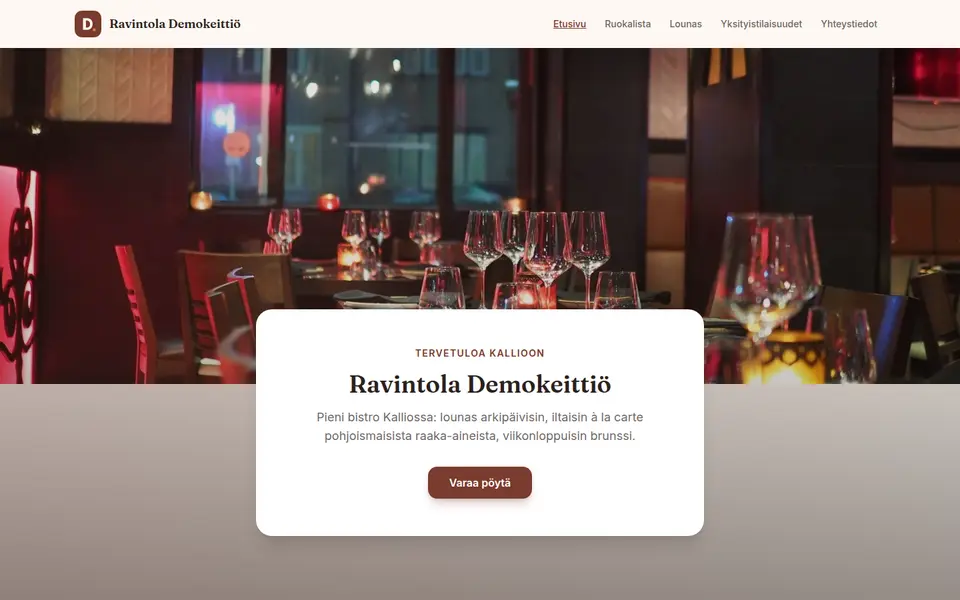
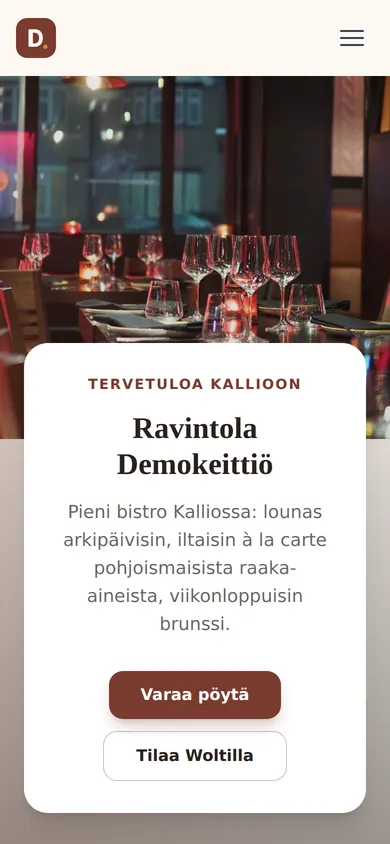
What a restaurant website needs
The list contains what we consider the most important things, in the order in which the details are usually looked for.
-
The menu as an HTML page, not a PDF
The menu is best published as an ordinary web page. Google can read the text of a PDF if the text can be copied, but by Google’s guidance the images in a PDF are not indexed. Structured data cannot be added to a PDF either, so the dishes, prices and diet labels are not in machine-readable form.
-
Allergen labelling on the menu
Ruokavirasto lists 14 mandatory allergens. If nothing can be ordered from the site, labelling them on the menu is a recommendation. If the site can be ordered from, the labelling is mandatory. The rules are covered in more detail below.
-
The lunch menu as its own page
If the restaurant serves lunch, the lunch menu is worth keeping on its own page, because people search for lunch differently from the à la carte menu and the menu changes more often. It is also a good idea to share it on lounaat.info, where the listing is free but the details are entered by hand.
-
Opening hours and exceptions
The opening hours should be the same on the site and in the Google Business Profile. Google recommends confirming the holiday hours in the profile even when they do not change, because otherwise the profile may show a warning that the hours might differ.
-
A "book a table" button on every page
The booking button should ideally sit at the top of the page and, on a phone, in a bar fixed to the bottom of the screen. If the booking system allows it, the link is worth pointing straight at the party size step, which saves the person booking one step.
-
Links to Wolt and Uber Eats
If the restaurant is on Wolt or Uber Eats, the site should link to them. Foodora left Finland on 27 February 2026 and Uber Eats started on 6 May 2026. The link address is best copied from the service’s own page, because it is hard to type correctly by hand. For example, Wolt’s addresses use the country code fin, not fi, and the Uber Eats identifier cannot be worked out.
-
Selling gift cards on the site
If the restaurant sells gift cards, it is worth selling them through the site too. With Gifti, for example, you get a buy button for the site, and the card can be delivered as a PDF or by post. Gifti Basic costs 15 €/mo + 2.8 % + 0.49 € per transaction and Pro 39 €/mo + 1.99 % + 0.39 €. Employee benefits such as ePassi and Smartum are payment methods, not gift cards.
-
A separate form for events
Group and event bookings are worth their own form, because they need different details from a table booking. The form should ask for the nature of the event, the date and a possible alternative date, the time, the number of people, the table layout and the payment method. Allergies are usually easier to ask about later, once the headcount is confirmed.
-
Instagram only after consent
An Instagram feed can be embedded without authentication, but every post loads as its own frame of roughly 50 kB, and data is sent to Meta as soon as the page loads. The feed is therefore best loaded only after the visitor has given consent.
-
The business profile and the menu link
The Google Business Profile has separate fields for the menu link and the ordering link. The menu link should point to the menu, not straight to an ordering service. If the restaurant has its own ordering channel, it can be marked as the preferred one for pickup and delivery.
-
schema.org Restaurant markup
Google has no rich result for menus, so the markup will not put the menu in the search results. The markup is still useful, because it is a machine-readable form of the menu that AI assistants, for example, can read.
-
Location, parking and how to get there
The address is worth writing out as text, not only showing on a map. If parking or the entrance needs directions, it is good to give them in the same place. The address should be the same on the site and in the Google Business Profile.
The law does not usually require a restaurant to publish its menu in HTML. The digital services act 306/2019 does not cover restaurants, and chapter 3 a, added with the accessibility directive, excludes microenterprises, that is companies with fewer than ten employees and a turnover or balance sheet of at most two million euros. An HTML menu is still worth making for search engines and usability. In the page’s structured data the type is Restaurant, which descends from LocalBusiness. Google reads only a link from the menu field, so the more detailed Menu structure is mainly for AI assistants. schema.org has replaced the menu field with hasMenu, but Google still uses the old name, so it is worth marking up both.
Table booking, ordering and the lunch menu
First the table booking systems: what they cost and what the booking address looks like. The booking address is the link that goes behind the "Book a table" button on the site. After that, ordering systems with their prices, and the places a lunch menu is worth sending to.
| System | Price | Booking address | Notes |
|---|---|---|---|
| TableOnline | No public price. The join page is only a contact form, and no credible third party estimate exists. Hundreds of restaurants from Finland and Estonia on board. | v2.tableonline.fi/instabook/bookings/<token> | The token is about seven characters and is case sensitive, so copy the address from the browser rather than typing it. |
| DinnerBooking | No public price, only a demo request. Over 1,400 restaurants in the Nordics. | book.dinnerbooking.com/fi/fi-FI/book/table/pax/<id>/<seurueen koko> | |
| resOS | Free 0 €/mo for 25 bookings, Basic 23 €/mo for 350, Plus 43 €/mo for 750 and Unlimited 63 €/mo. Add-ons 7.99-19.99 €/mo. The vendor states that it charges nothing per booking, per cover or as commission. | <ravintola>.resos.com/booking | |
| Superb | Go 0 €/mo with a 0.99 % IC++ payment fee. The Plus monthly fee is not published; its payment fee is 0.75 % IC++. The vendor states that it charges no per cover fee. The interface is also available in Finnish. | <ravintola>.superbexperience.com/reserve/experience |
-
TableOnline
- Price:
- No public price. The join page is only a contact form, and no credible third party estimate exists. Hundreds of restaurants from Finland and Estonia on board.
- Booking address:
v2.tableonline.fi/instabook/bookings/<token>- Notes:
- The token is about seven characters and is case sensitive, so copy the address from the browser rather than typing it.
-
DinnerBooking
- Price:
- No public price, only a demo request. Over 1,400 restaurants in the Nordics.
- Booking address:
book.dinnerbooking.com/fi/fi-FI/book/table/pax/<id>/<seurueen koko>
-
resOS
- Price:
- Free 0 €/mo for 25 bookings, Basic 23 €/mo for 350, Plus 43 €/mo for 750 and Unlimited 63 €/mo. Add-ons 7.99-19.99 €/mo. The vendor states that it charges nothing per booking, per cover or as commission.
- Booking address:
<ravintola>.resos.com/booking
-
Superb
- Price:
- Go 0 €/mo with a 0.99 % IC++ payment fee. The Plus monthly fee is not published; its payment fee is 0.75 % IC++. The vendor states that it charges no per cover fee. The interface is also available in Finnish.
- Booking address:
<ravintola>.superbexperience.com/reserve/experience
Ordering systems and prices
| Service | Price |
|---|---|
| Tilausruoka.fi | 79 €/mo + VAT, no commission. |
| Food4You | Startti 0 €/mo + 3 %, Aktiivinen 39 €/mo + 1.8 %, Kasvu 89 €/mo + 1.2 %. Setup 490-790 €. |
| Oma Ravintola Pro | 150 €/mo and a 250 € setup fee. |
| Jimani | 29 €/mo for the first year, then 49 €/mo. |
| Ravintola-sovellus.fi | A one-off 1,950 € + VAT. |
| Restolution and Solmio | No public price. Both are point of sale systems whose online shop redeems a gift card into the same till. Restolution is the same company as Kassamagneetti. |
| Wolt and Uber Eats | Neither publishes its commission. Wolt says it depends on the delivery model and is a matter for the contract. Wolt Drive delivers orders from your own online shop even when you are not on the Wolt marketplace; the price is not published. |
Tilausruoka.fi
- Price:
- 79 €/mo + VAT, no commission.
Food4You
- Price:
- Startti 0 €/mo + 3 %, Aktiivinen 39 €/mo + 1.8 %, Kasvu 89 €/mo + 1.2 %. Setup 490-790 €.
Oma Ravintola Pro
- Price:
- 150 €/mo and a 250 € setup fee.
Jimani
- Price:
- 29 €/mo for the first year, then 49 €/mo.
Ravintola-sovellus.fi
- Price:
- A one-off 1,950 € + VAT.
Restolution and Solmio
- Price:
- No public price. Both are point of sale systems whose online shop redeems a gift card into the same till. Restolution is the same company as Kassamagneetti.
Wolt and Uber Eats
- Price:
- Neither publishes its commission. Wolt says it depends on the delivery model and is a matter for the contract. Wolt Drive delivers orders from your own online shop even when you are not on the Wolt marketplace; the price is not published.
Distributing the lunch menu
| Service | How to get in | Price |
|---|---|---|
| lounaat.info | Register and add the restaurant. Entry is manual: there is no public feed or API specification. Without an account the menu can be suggested through a separate form. | Free. |
| Lounastaja | The automatic feed: it distributes the menu to lounaat.info, Google, lounas.app, lounasta.fi, social media and info screens. It also offers an outbound JSON and RSS interface for mirroring the same menu onto your own page. | A 30 €/2 months trial, then 39-59 €/mo + VAT. |
| lounasmenu.fi | A registration form. | Paid; prices on request. |
| lounasta.fi and lounas.app | A submission form, but both point you at Lounastaja. | - |
lounaat.info
- How to get in:
- Register and add the restaurant. Entry is manual: there is no public feed or API specification. Without an account the menu can be suggested through a separate form.
- Price:
- Free.
Lounastaja
- How to get in:
- The automatic feed: it distributes the menu to lounaat.info, Google, lounas.app, lounasta.fi, social media and info screens. It also offers an outbound JSON and RSS interface for mirroring the same menu onto your own page.
- Price:
- A 30 €/2 months trial, then 39-59 €/mo + VAT.
lounasmenu.fi
- How to get in:
- A registration form.
- Price:
- Paid; prices on request.
lounasta.fi and lounas.app
- How to get in:
- A submission form, but both point you at Lounastaja.
- Price:
- -
The prices are the vendors’ published list prices and usually exclude VAT. Check the current price on the vendor’s own page before signing. Quandoo is left off the list because it is closing: it takes bookings until 30 September 2026 and the service is shut down on 31 December 2026. TheFork, OpenTable and ResDiary are large elsewhere, but in Finland they have virtually no restaurants: thefork.fi redirects to thefork.com and Finland is not on its market list, and OpenTable’s Finnish pages return an empty result. Note also that TableOnline, DinnerBooking and Superb are not on Google’s Reserve with Google partner list, so the practical answer is to put your own booking address in the business profile’s booking link field.
How table booking is attached to the site
The short answer
We recommend a button that opens the vendor’s own booking page in a new tab. Booking can also be embedded on the page, but the experience is usually better when the guest books a table directly on the vendor’s own page. An embed can also stop working if the vendor changes its settings. If you want booking embedded, tell Kamu.
Step by step
- The booking page address is best copied from the browser rather than typed by hand, because the TableOnline identifier, for example, is case sensitive.
- The address should go behind a clearly labelled button, for example "Book a table".
- The button is worth placing in the header, at the end of the service sections and, on a phone, in a fixed bottom bar. All the buttons should use the same address.
- The link opens in a new tab and carries rel="noopener", so the page that opens cannot reach back into your own page.
- If the system allows it, the link is worth pointing straight at the party size step.
- It is worth checking on a phone that the button is visible without scrolling.
- The same booking address is worth adding to the booking link field of the Google Business Profile as well, because the systems most common in Finland are not Reserve with Google partners.
- Wolt has an official Order now button, installed as a snippet from the Merchant Portal. Uber Eats has no widget, but it does have a partner badge set whose use requires Brand Desk approval and takes 3-5 working days.
On Kotisivukamu
On Kotisivukamu you tell Kamu in plain language, for example: "My booking address is v2.tableonline.fi/instabook/bookings/abcdefg. Put a Book a table button at the top and at the end of every section." The button appears in the header, at the end of the sections and in the bottom bar on a phone, and it opens in a new tab. Nothing needs to be installed.
Allergens on the menu
By Ruokavirasto’s list there are 14 mandatory allergens: cereals containing gluten, that is wheat, rye, barley and oats, crustaceans, eggs, fish, peanuts, soybeans, milk including lactose, nuts, celery, mustard, sesame seeds, sulphur dioxide and sulphites above 10 mg/kg or mg/l, lupin and molluscs. Peanuts and nuts are separate entries, and they must not be merged.
On the premises the main rule is written information near the food. An oral procedure is allowed, but only if both conditions are met: a visible notice that the information is available from the staff on request before the purchase decision and at no extra cost, and that the information really is on the premises in written or electronic form, available to the staff and to the inspector. Staff memory is not enough. The name of the dish and the country of origin of the meat must always be given in writing.
On a menu published on a website the obligation depends on whether the page can be ordered from. If the page only presents the food and no product can be ordered through it, this is marketing, to which the distance selling information requirements do not apply, and labelling allergens is a recommendation. The information must still not be misleading: if a dish is labelled gluten free, that has to be true. If the page can be ordered from for pickup, home delivery, pre-order or through an online shop, the name of the dish, the allergens and the country of origin of the meat must be given before the purchase. The responsibility lies with whoever registered the domain, and the information is given in Finnish or Swedish.
For that reason the allergens are worth labelling on the menu in any case, because it is not entirely clear when, for example, a free booking form turns the page into an ordering channel. Diet labels are also worth adding as structured data: schema.org RestrictedDiet covers the Finnish VE, G and L labels with the values VeganDiet, VegetarianDiet, GlutenFreeDiet and LowLactoseDiet.
On the drinks list: section 50 of the alcohol act was rewritten by act 589/2026, in force on 3 July 2026, and the consolidated version on Finlex does not yet show the new wording. A drinks list with prices may be published on your own website. The current wording of the section is worth checking at the source before drawing further conclusions. Since 1 January 2026 alcohol supervision sits with the Licensing and Supervision Agency.
Want a clear, working website for your restaurant or café?
Start a free trial →What a restaurant website costs
The price of the site does not depend on the trade: a restaurant site costs the same on Kotisivukamu as any other business site. The booking system, the lunch menu distribution, the gift card service and the delivery apps’ commissions are separate costs and come straight from the provider at the prices in the tables above.
If you want to compare the options before deciding, we have collected the published prices of Finnish agencies, website builders and hosts on a separate page.
Restaurant websites: frequently asked questions
Which table booking system makes sense in Finland?
TableOnline and DinnerBooking are widely used in Finland, but neither publishes a price. If a published price matters, resOS and Superb publish theirs. Quandoo shuts down on 31 December 2026, so it is no longer an option. TheFork, OpenTable and ResDiary are large elsewhere, but in Finland they have virtually no restaurants.
How is the booking system attached to the site?
With a button that opens the vendor’s booking page in a new tab. We do not recommend an embed, because it often behaves badly on a phone, but Kamu will do it on request. What matters most is that the booking button is on every page and in the bottom bar on a phone.
May the drinks list prices be published on the site?
A drinks list with prices may be published on your own website. Section 50 of the alcohol act was rewritten by act 589/2026, in force on 3 July 2026, and the consolidated version on Finlex does not yet show the new wording, so the current text of the section is worth checking at the source before drawing further conclusions. Since 1 January 2026 alcohol supervision sits with the Licensing and Supervision Agency.
Which delivery apps operate in Finland now?
Wolt and Uber Eats now operate in Finland. Foodora left Finland on 27 February 2026 and Uber Eats started on 6 May 2026. Neither publishes its commission. The link address is best copied from the service’s own page, because Wolt’s addresses, for example, use the country code fin, not fi, and the Uber Eats identifier cannot be worked out. Wolt has an official Order now button for websites. Uber Eats has no equivalent button, and using its partner badge requires Brand Desk approval.
Other trades
The front page carries the same list for other trades, and from there you can describe your own business and see what kind of site comes out.
See all trades →